
GPX Path for Mac: your GPX tracks, offline
A Mac app to plan a route point by point, open any GPX file and keep maps on your disk. It is not on sale yet: people on the waitlist will get the launch price.


€24.99 a year incl. VAT, every feature
€14.99 for the first year for people on the waitlist
- Annual subscription, cancel anytime
- Secure payment
- macOS 14 Sonoma or later
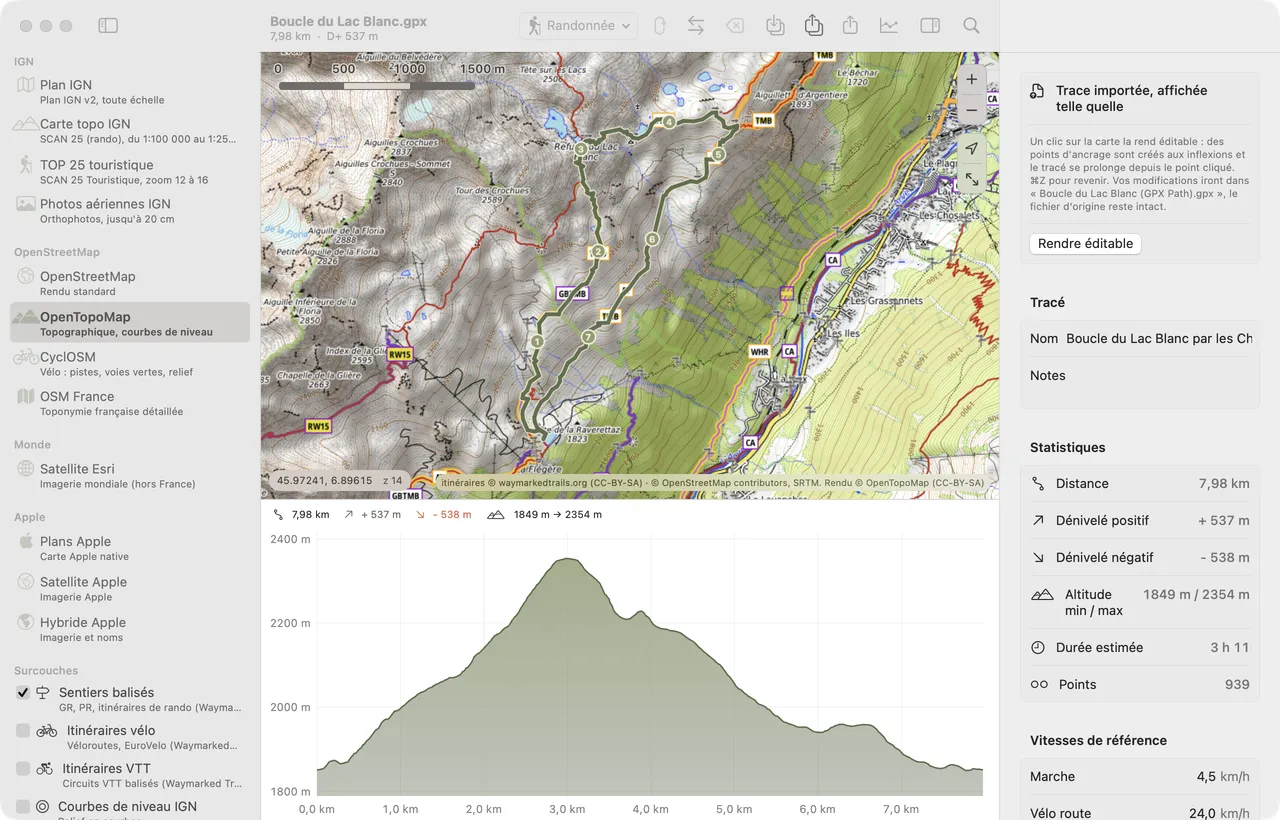
GPX Path for Mac window: the Lac Blanc loop on OpenTopoMap, base maps listed on the left, elevation profile below and stats on the right (7.98 km, 537 m of elevation gain)
Base maps
- Distance
- 7.98 km
- Gain
- + 537 m
- Loss
- - 538 m
- Time
- 3 h 11
What the app does
Plan point by point
Each click adds a point; the leg follows paths for the mode you pick: hiking, road bike, gravel, MTB, shortest, car or straight line. Routing is done by BRouter.
Offline maps
Draw an area on the map, or around the route (1 to 5 km), and download it. Before starting, the app shows the tile count and the estimated size.
Base maps and overlays
IGN Plan, IGN aerial imagery, OpenStreetMap, OpenTopoMap, CyclOSM, satellite view; contour lines, slopes, land registry.
Profile and elevation
IGN RGE ALTI elevation in France, other sources elsewhere. The profile follows the map on hover; gain and loss are smoothed, and duration is estimated from your speeds.
Your GPX files, editable
Open any GPX, then “Make editable” to rework it point by point. The original is never overwritten: edits go to a copy.
Export and share
GPX export as a track or a route, with elevation, points of interest and simplification; AirDrop to your iPhone. Automatic saving to Documents/GPX Path.
The site and the app
On gpxpath.com, you open and convert your files for free, in your browser. The app adds point-by-point route planning, track editing and downloaded maps.
With no connection, downloaded maps display and your tracks open. Routing along paths and elevation lookups use online services (BRouter, IGN): those two features need a connection.
Requirements
- macOS 14 Sonoma or later
- Mac with Apple silicon (M1 and later)
- An internet connection to plan along paths, get elevations and download maps
Price and subscription
- €24.99 a year including VAT, every feature included.
- €14.99 for the first year for people on the waitlist, then €24.99 a year.
- Cancel anytime. Secure payment.
- Updates included. No ads, no account to create.
Frequently asked questions
When is the app coming out?
The date is not set yet. People on the waitlist will get an email on release day, with the launch price.
Do I need an account?
No. The app works with no account and no sign-up; your tracks stay on your Mac.
Where are my tracks saved?
In standard GPX files, in the Documents/GPX Path folder (you can change the folder in Settings). Any app that reads GPX opens them.
Is there an iPhone or iPad version?
No, the app is built for macOS. An exported GPX goes to your iPhone over AirDrop, to open in the app of your choice.
Do offline maps take up a lot of space?
It depends on the area and the zoom level. The estimated size shows before each download, and the “Offline maps” window lists your areas so you can update or delete them.